School management software for Nigerian schools

Your school, running itself.

Fees recorded once and impossible to change quietly. Results compiled and approved without a lost weekend. Parents who know their child arrived. Your staff still in charge of every decision.
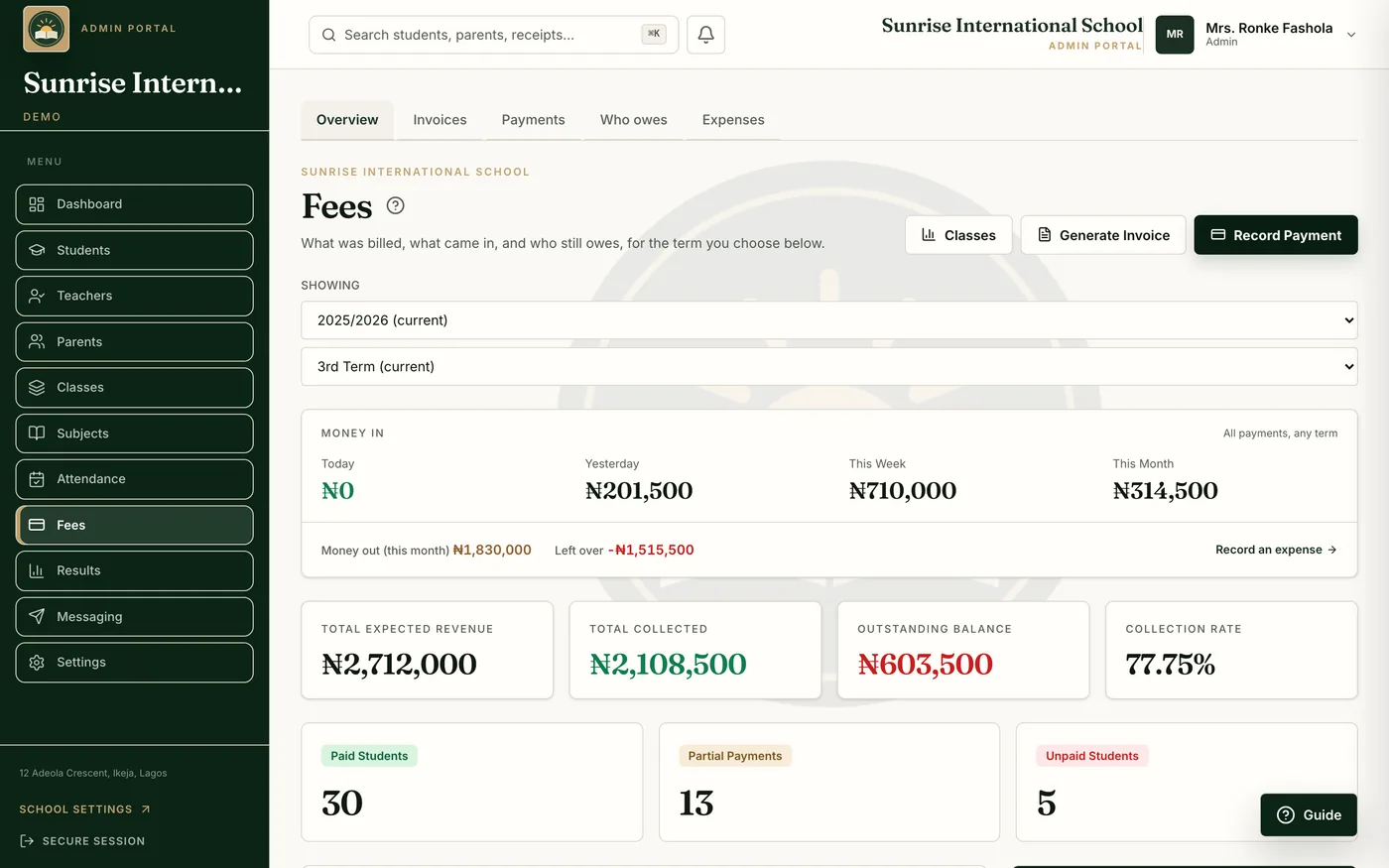
The SchoolNest finance overview for the demo school: money collected this term, expected revenue, outstanding balances and recent payments.
Owner. The finance overview, as the proprietor sees it.
Registered in Nigeria
SchoolNest HQ Ltd, RC 9651472
Founding schools
Standard Schools and Adetoke Schools, Ilorin
Backups
Encrypted, every night
Your records
Export to Excel at any time

The product

Real screens.

Taken from the demo school in the current build. Nothing here is drawn.
Forty-three seconds, no sound: a fee recorded, results compiled and published, and the parent’s phone.
Finance overview for the owner: collected, expected and outstanding amounts with a list of recent payments.
Owner. Money in, expected and outstanding, on one screen.
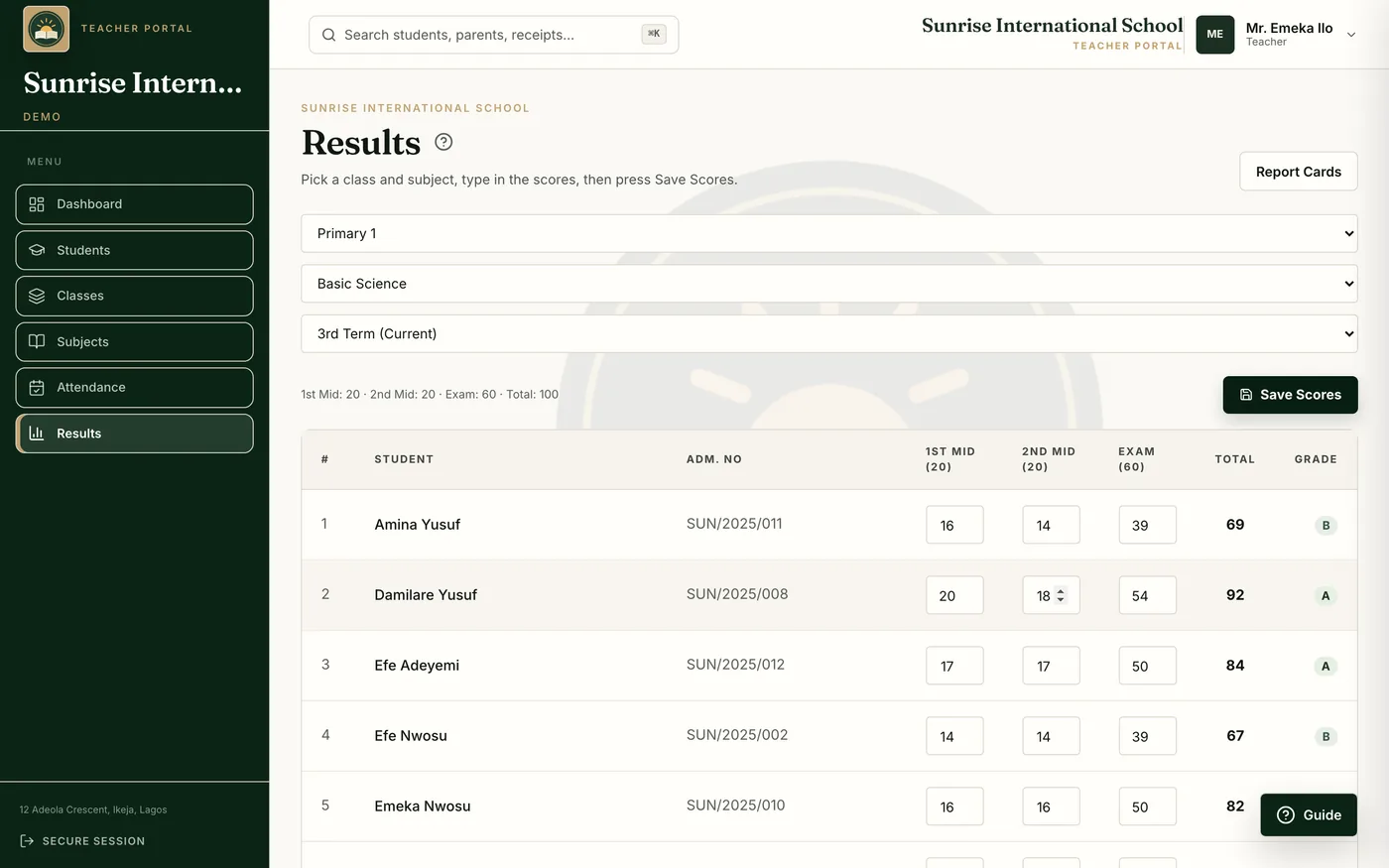
Teacher score entry: a class list with CA and exam columns, totals and grades computed automatically.
Teacher. Score entry, with totals and grades computed.
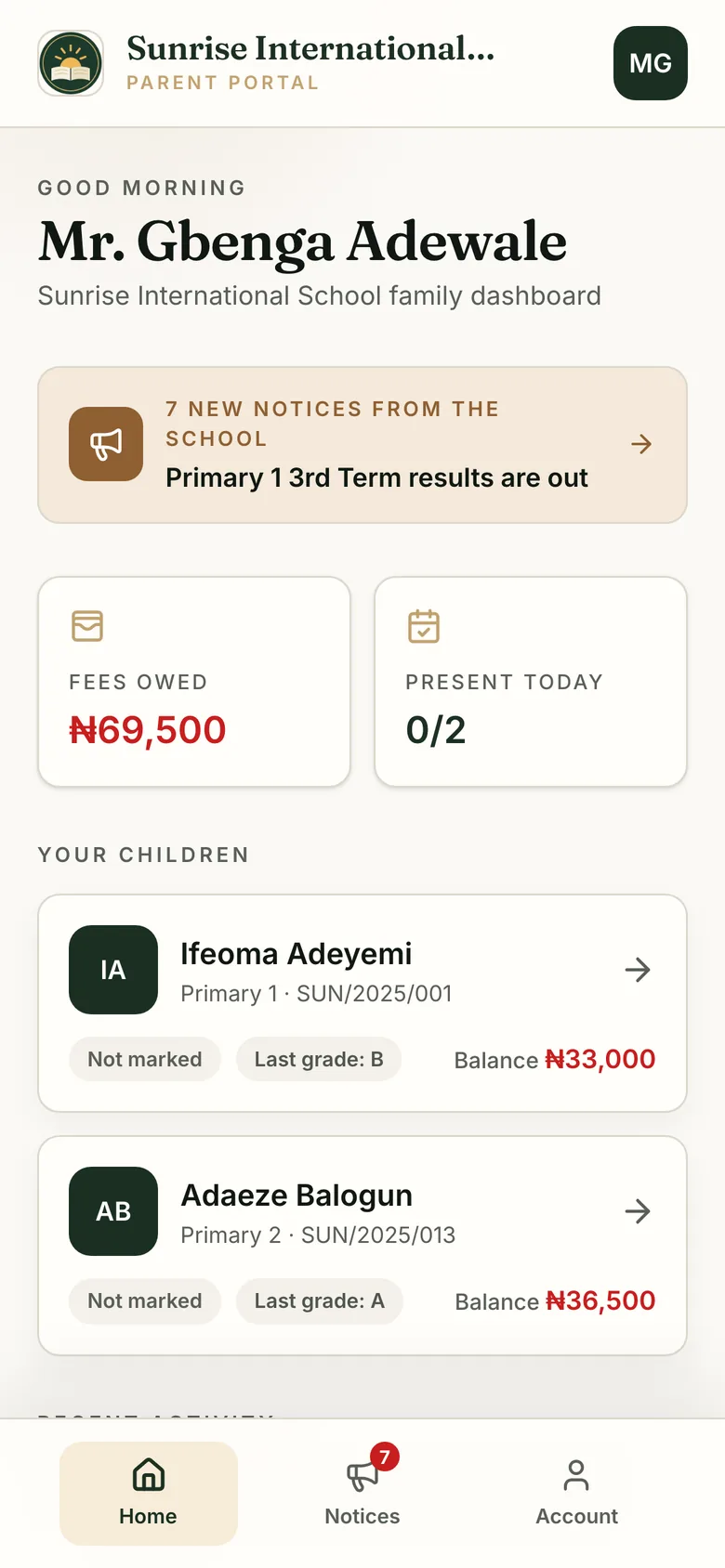
A parent's phone showing their children, fee balances, receipts and published results.
Parent. Signed in by phone number: balances, receipts, results.

School fees

One payment, recorded once.

  1. 1.A parent pays: cash, POS, bank transfer, or online through your school's own Paystack account.
  2. 2.The bursar records it once.
  3. 3.A numbered receipt issues, and the parent is told.
  4. 4.The child's balance, the class total, the defaulters list and your dashboard update from that one entry.

Nothing can be changed quietly.

Receipts run in sequence, so a removed one leaves a gap. Cancelling a payment can need your approval. Transfers tick off against your bank statement, and the cash is counted before the drawer closes.
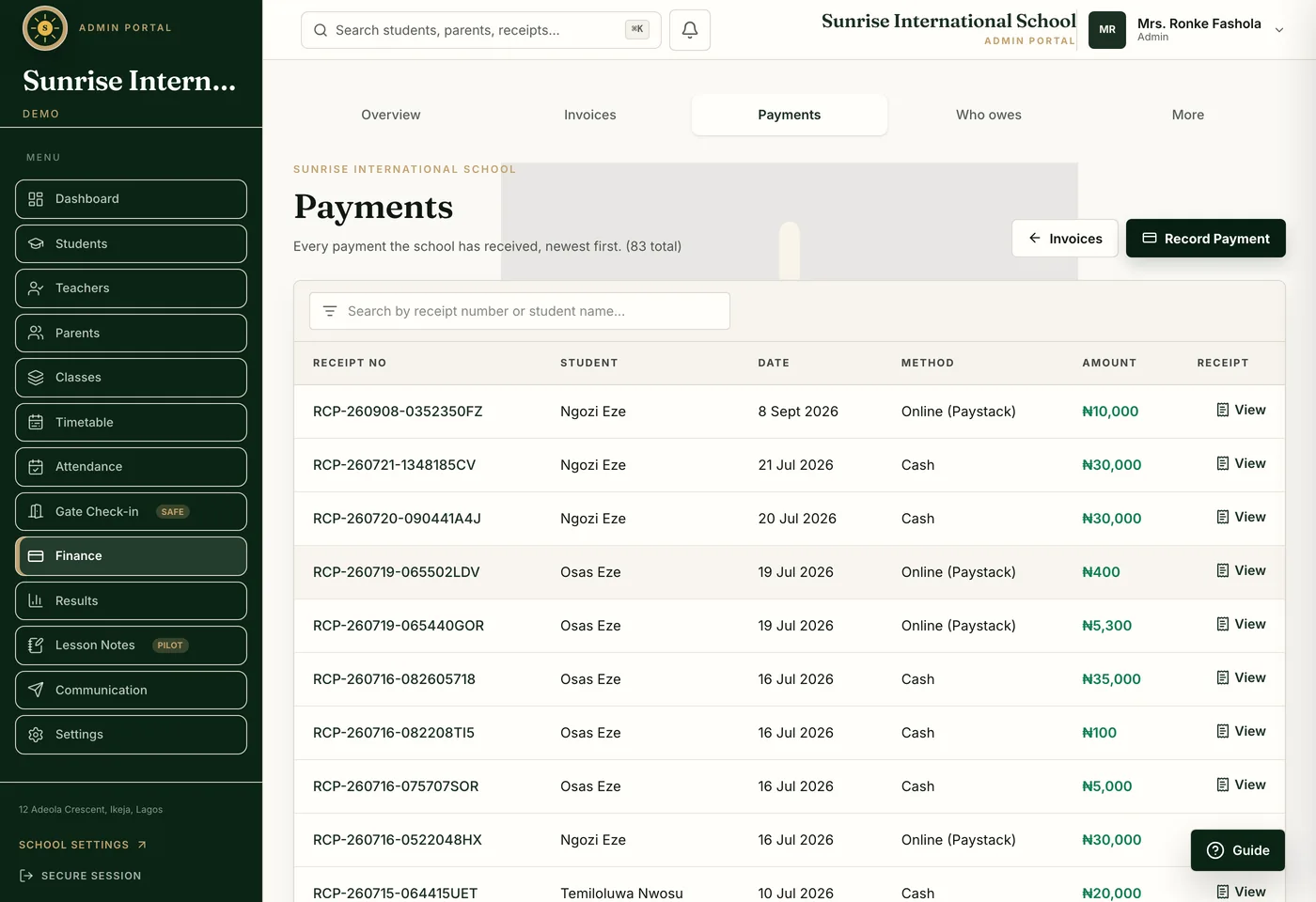
The payments list in SchoolNest: every payment the school has received, newest first, each with its receipt number, the pupil, the date, the method (cash or online through Paystack) and the amount.
Bursar. Every payment, with its receipt number and method.
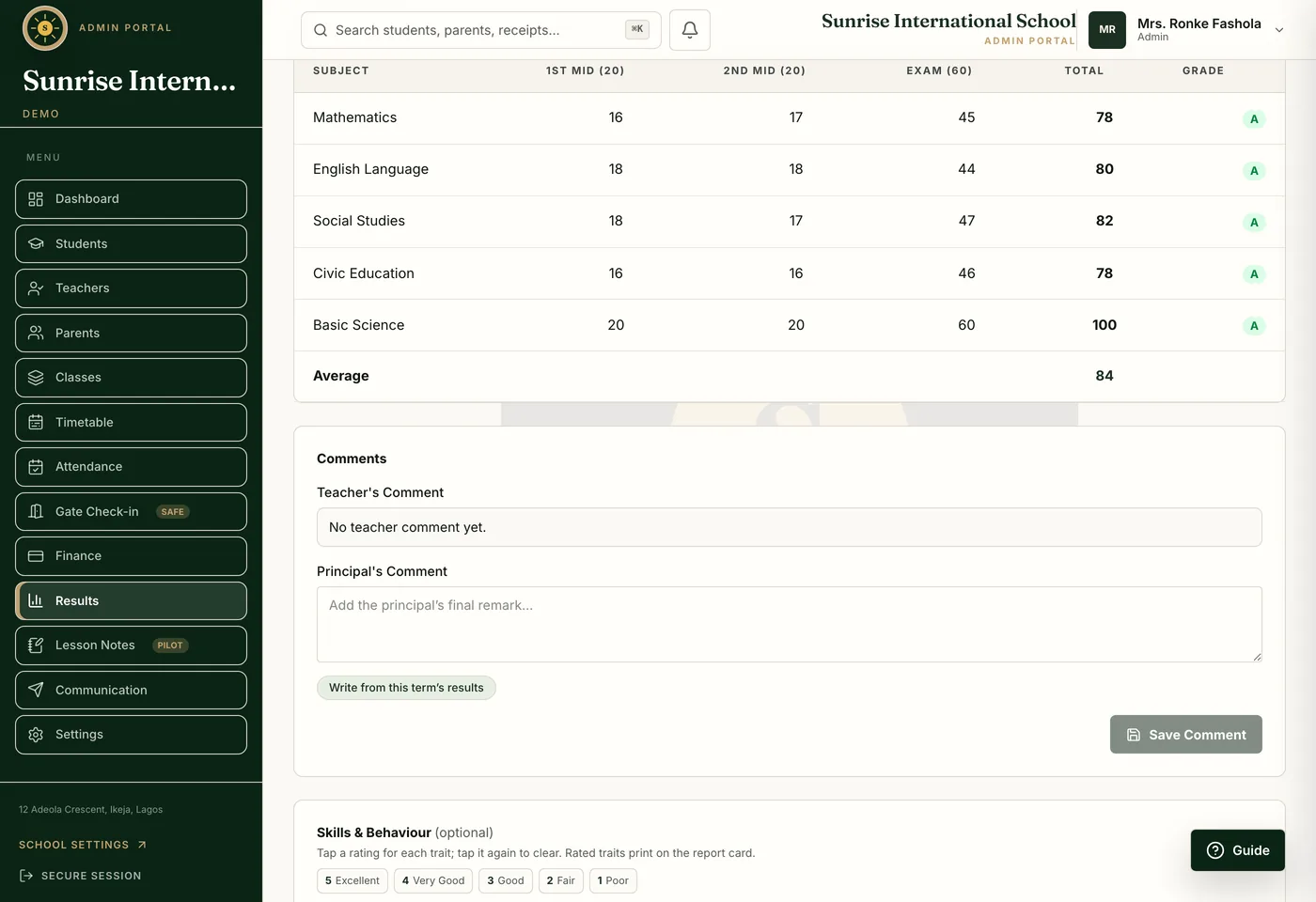
A pupil's report card in SchoolNest: five subjects with first and second mid-term scores, exam score, total and grade, the class average, and the teacher's and principal's comment boxes.
Report card. One pupil's term: scores, grades, position and average.

Results and report cards

Results week, without the weekend.

Teachers enter scores on their phones; totals, grades and positions are computed. The principal approves a class before anything is released. Report cards print one at a time or for the whole class, a mid-term result can go out before the final, and parents read it on their phone.

Comments come drafted. Teachers decide.

Each comment is drafted from that child’s own scores, attendance and traits, and the teacher edits or replaces it before it is saved.

Your paperwork

Photograph it. We do the typing.

Many schools give up on new software in the first two weeks, when everything has to be typed in. So we take that part off you: send photographs of what the school already has, and we turn them into records.

A person always checks.

Nothing is saved until your staff agree. It never adds a pupil, publishes a score or approves a note on its own. It fills the form in and waits.

What your school already has

What it becomes

A handwritten class register

Your student list, without the retyping.

A page of a teacher's mark book

The term's scores, matched to the roster.

The timetable taped to the staff-room wall

The timetable grid, clashes already checked.

A term's real scores, attendance and traits

A draft comment, from that child's own numbers.

A lesson note, typed or photographed

Checked against your own template.

The gate

Know who is on campus, the moment they arrive.

One scan at the gate, and a parent three hours away knows their child is safe.
No machine to buy.
A camera phone reads the child's ID card.
The parent knows.
An alert on arrival, by app or SMS.
The register fills itself.
Arriving marks the child present, late arrivals are flagged, and staff scan in too.
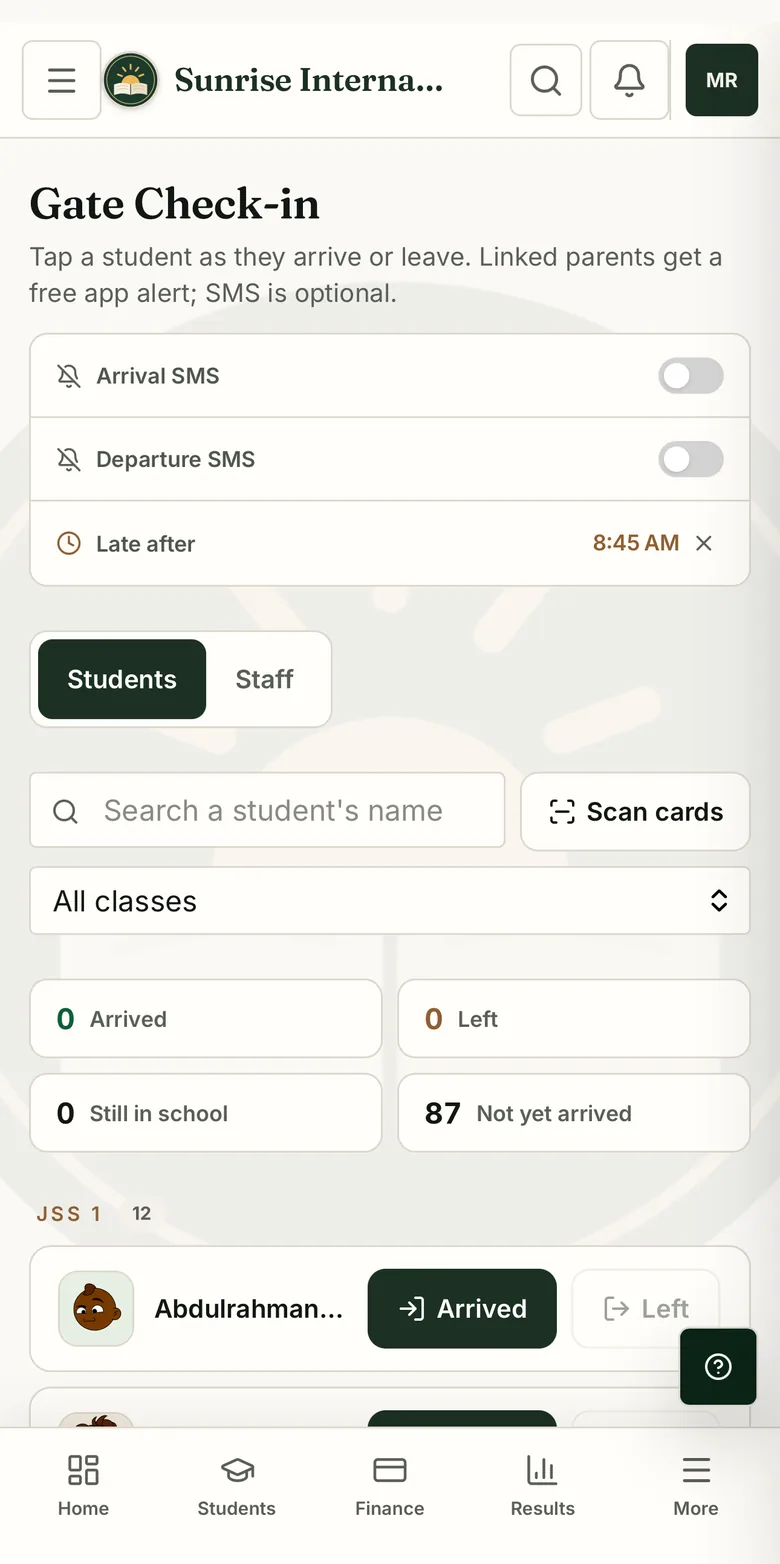
The SchoolNest gate check-in screen on a phone: arrival and departure SMS toggles, a late-after cutoff time, a Scan cards button, counts of pupils arrived, left and not yet arrived, and the class list with Arrived and Left buttons beside each pupil.
Gate. Scan a card or tap a name; the register and the parent's alert follow.

Pricing

Your student count sets your price.

Pay per term, the way your school already budgets. Every plan includes every module and setup by us.

Up to 150 students

Starter

₦75,000per term

or ₦200,000 a year, saving ₦25,000

₦500 per student per term, at 150 students.

151 to 500 students

Growth

₦150,000per term

or ₦400,000 a year, saving ₦50,000

₦300 per student per term, at 500 students.

501 to 1,000 students

Scale

₦250,000per term

or ₦675,000 a year, saving ₦75,000

₦250 per student per term, at 1,000 students.

One fixed price for the term; enrolment is reviewed only at renewal. SMS charges, payment-provider fees and on-site travel are separate. Above 1,000 students, we write a custom plan.

The first five

The Founding Schools Program.

Five schools, set up personally by our founder, on terms later schools will not get.

Three of five places still open.

  1. Standard Schools, Ilorin
  2. Adetoke Schools, Ilorin
  3. Place 3: open
  4. Place 4: open
  5. Place 5: open
“We moved our fees and results to SchoolNest this term. Parents now check balances and results on their phones instead of calling the office.”
Standard Schools, Ilorin. The first founding school, named with permission.
Setup done for you
Students, classes, fees, training. Free.
30 days to evaluate
In your real school, before you pay.
First paid term at half price
Off the published price for your band.
Renewal rate held for 12 months
Recorded in writing.

Half price applies once, to the first paid term after the evaluation, and cannot be combined with another discount. Terms as written in September 2026.

How we start

Usually live within one working day.

Send a spreadsheet or photographs of the register; we build the classes, set the fees, create every login and train your team.

How onboarding usually goes

Questions

Three things schools ask first.

Is our school data safe?

Each school's records are kept apart, access is by role, and every payment or result change records who made it. The database is encrypted and backed up nightly.

Read the security page

Can parents pay school fees online?

Yes. Online payments go through your school's own Paystack account into your own bank account. SchoolNest never holds the money.

Do we need to install anything?

No. It works in the browser on the phones and computers your staff and parents already have, and can sit on a home screen like an app.

SchoolNest

Start this term.

Send one WhatsApp message. We set up your school under its own name, and your team gets 30 days to evaluate it before you pay.

Or call +234 906 532 8108